One workspace for everything a lesson needs.
Open any lesson and everything is right there: objectives, activities, materials, homework, attachments, notes, and AI suggestions — without leaving the planner. No tab switching, no separate document, no lost context. The Lesson Studio supports quick iteration so teachers can refine a plan right before class or immediately after a debrief.
What the AI can do
AI can draft lesson content, refine materials, and update plans inside the lesson workspace.
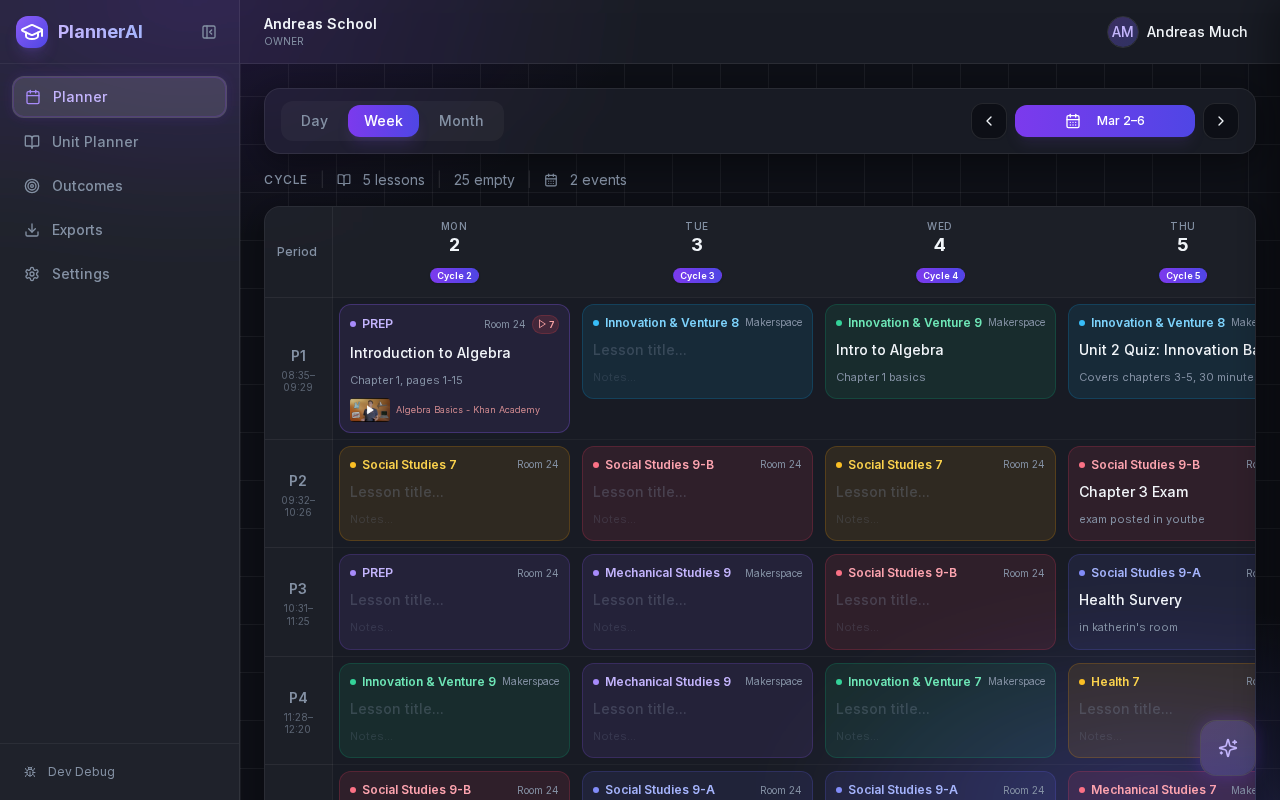
The lesson workspace keeps planning details, resources, and AI support in one place.
Context aware
Connected to the weekly planner, schedule rules, and unit structure.
Teacher controlled
You review and refine changes instead of handing the whole process away.
Built for school reality
Designed around shifting timetables, real curriculum work, and mid-week edits.
Where Lesson Studio fits into the planning week.
Open a lesson without leaving the planner and work on objectives, activities, resources, homework, and notes in one flow.
Reduce context-switching by keeping editing, reviewing, and AI-assisted drafting inside the same workspace.
Support quick iteration when teachers need to refine a lesson right before class or after a debrief.
Real reasons teachers reach for this feature.
Lesson drafting
Open a blank lesson cell, type a rough idea, and let the AI fill in objectives, activities, and a closing task.
Material attachment
Attach a handout, slide deck, or link directly to the lesson so everything is findable in one place.
Pre-class refinement
Two minutes before the bell, open the lesson, adjust the warm-up, and save — all inside the planner view.
What it looks like when a teacher actually uses it.
These example prompts and outcomes show the kind of planning work this feature is designed to handle.
Prompt
"Turn this rough note into a learning goal, short mini-lesson, guided discussion, and exit ticket for tomorrow."
Outcome
Planlark restructures the note into a cleaner lesson draft and updates the lesson record inside the workspace.
Prompt
"Add a homework task to the current math lesson and set it due next Monday."
Outcome
Planlark adds the homework entry, links it to the lesson, and marks the due date on the calendar.
Prompt
"Rewrite the objective to be more student-friendly."
Outcome
The AI rewrites the learning goal in plain language and saves the updated version to the lesson.
Keep exploring the planning workflow.
Related help
Learn how to use this in the product.
Unit Planning
How to build units and lesson sequences in Planlark
Use the Unit Planner to create a unit, add source material, generate lesson sequences on real dates, and keep outcomes tied to the plan.
Read help guideAI
How to use Lark inside Planlark
Use Lark by text or voice to create, edit, delete, reschedule, and explain planning work across lessons, units, outcomes, and assessments.
Read help guideAssessments
How to create assessments and assignment templates in Planlark
Build quizzes, exit tickets, standard assignments, and text-based assignments with answer keys, editable question types, and AI control over each assessment.
Read help guideRelated features
Keep exploring the workflow.
Scheduling
Auto-Scheduled Plans
Units and lesson sequences can land on real class dates automatically using your rotation, holidays, and calendar overrides.
Read feature pageCalendar
Calendar Command Center
Your planner stays connected to the actual school calendar, not a generic week view.
Read feature pageReflection
Daily Debrief
Quick end-of-day reflection becomes planning memory instead of getting lost in notes.
Read feature pageEarly access
Try Lesson Studio inside the full planner
Join the waitlist to see how Planlark connects weekly planning, AI actions, schedule logic, and curriculum tracking.
No credit card required. Early access updates only.