Safer AI planning with confidence, conflict detection, and rollback coverage.
AI planning is only useful when teachers can trust it. Planlark now carries confidence and reasons through assistant proposals, blocks stale-data conflicts before changed lessons or tasks are overwritten, broadens version snapshots and rollback coverage, and surfaces planning-health issues earlier. The goal is not just faster planning, but safer planning that stays explainable and reversible.
What the AI can do
AI can explain why it matched a target, surface planning risks, and stop unsafe actions before they overwrite newer data.
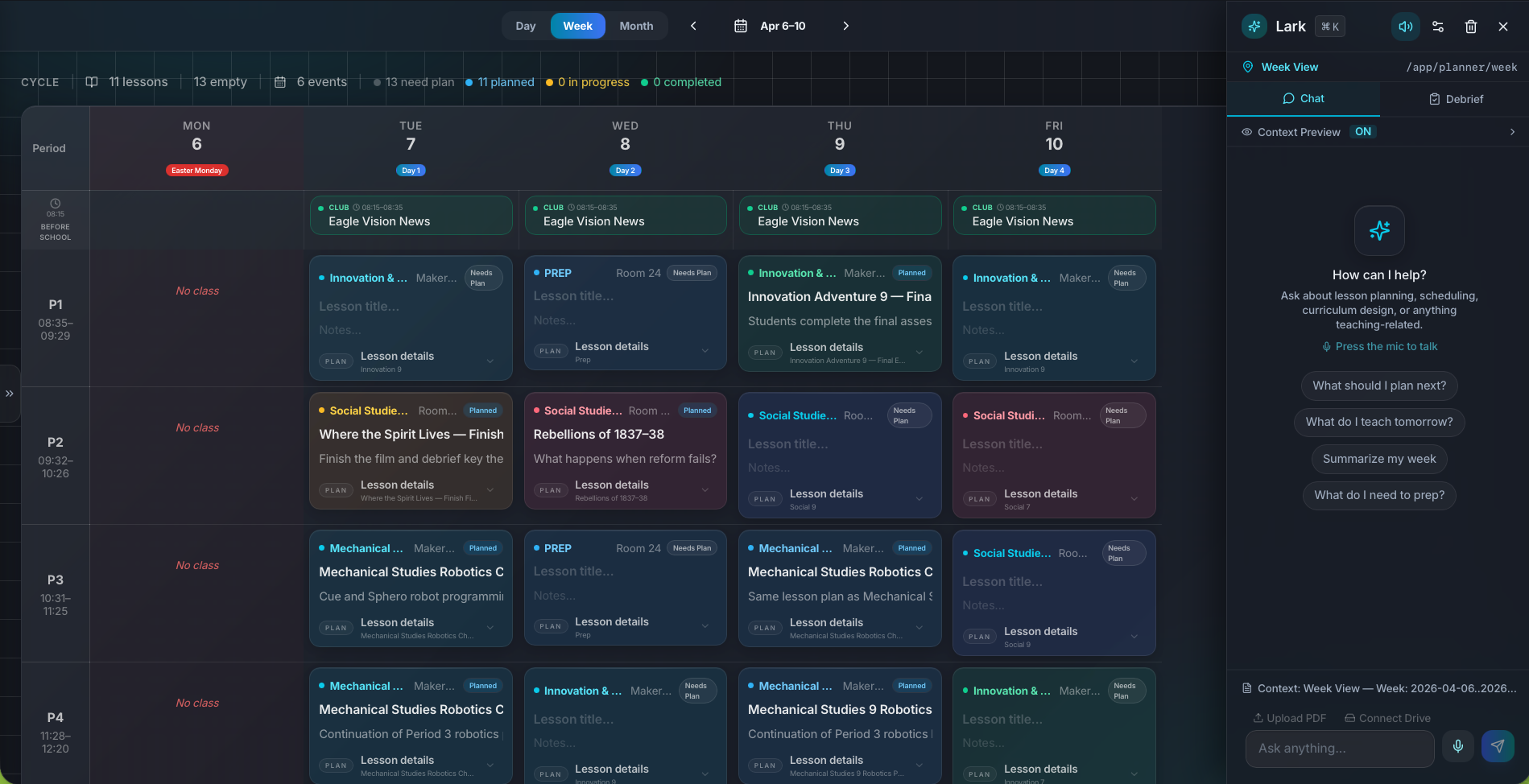
Planning intelligence is now designed to be explainable and reversible instead of purely automatic.
Context aware
Connected to the weekly planner, schedule rules, and unit structure.
Teacher controlled
You review and refine changes instead of handing the whole process away.
Built for school reality
Designed around shifting timetables, real curriculum work, and mid-week edits.
Where Planning Intelligence Controls fits into the planning week.
Carry confidence and short reasoning through assistant proposals so teachers can judge whether the system is matching the right lesson, task, or schedule target.
Block stale-data conflicts when a lesson, task, project, or artifact changed after the suggestion was generated.
Expand rollback coverage and planning-health scanning so risky actions are easier to review, reverse, and trust.
Real reasons teachers reach for this feature.
Safe lesson edits
Review why the assistant chose a specific lesson and avoid overwriting new changes made elsewhere in the planner.
Conflict detection
Stop a task or artifact update when the underlying record changed since the proposal was created.
Health awareness
Use surfaced risk signals for overdue work, missing prep, and broken dependencies before the week gets harder to recover.
What it looks like when a teacher actually uses it.
These example prompts and outcomes show the kind of planning work this feature is designed to handle.
Prompt
"Move the quiz prep forward and update the lesson sequence, but only if you are sure you have the right Social 9A lessons."
Outcome
Planlark returns a proposal with confidence and reasons, blocks the action if the target data changed, and keeps version history available for rollback.
Prompt
"What planning risks should I fix before tomorrow?"
Outcome
The assistant surfaces overdue work, prep gaps, and dependency issues with short reasons instead of leaving them hidden.
Prompt
"Apply this task update only if nothing changed since you suggested it."
Outcome
Planlark checks the latest record version first and returns a conflict instead of blindly overwriting newer data.
Keep exploring the planning workflow.
Related help
Learn how to use this in the product.
Getting Started
How to get started with Planlark
Set up your schedule, classes, and first planning workflow so the weekly planner, units, and AI actions all use the right school context.
Read help guideCurriculum
How to import curriculum and outcomes in Planlark
Paste curriculum text or ask Lark to import a framework, then review sub-outcomes, guiding questions, QA warnings, and shared-library approval before planning from it.
Read help guideUnit Planning
How to build units and lesson sequences in Planlark
Use the Unit Planner to create a unit, add source material, generate lesson sequences on real dates, and keep outcomes tied to the plan.
Read help guideRelated features
Keep exploring the workflow.
Daily Planning
AI Day Planning
Planlark fills before-school, lunch, and after-school windows with the right work using your actual teaching schedule.
Read feature pageArtifacts
Artifacts Workspace
Create worksheets, assessments, readings, study guides, vocabulary work, rubrics, and handouts in a centralized artifacts workspace backed by Google Docs.
Read feature pageScheduling
Auto-Scheduled Plans
Units and lesson sequences can land on real class dates automatically using your rotation, holidays, and calendar overrides.
Read feature pageEarly access
Try Planning Intelligence Controls inside the full planner
Join the waitlist to see how Planlark connects weekly planning, AI actions, schedule logic, and curriculum tracking.
No credit card required. Early access updates only.